API & Webhooks
The CRM API for your lead data. Leads in, meetings out. No CSV.
Your system sends new leads through the REST API, and Coldfire merges duplicates. You find every lead again by your own ID and change exactly the fields that changed. And for every new meeting, your server gets a signed webhook.
No setup fee · cancel anytime
- 15
- endpoints for leads, lists, tasks and notes
- 8
- permissions, set per API key
- 5,000
- leads per import request
- 120
- requests per minute per area, per key
Where lead data gets stuck between tools
01
CSV back and forth
Export from one tool, import into the other, every day. The columns don't match, and if you forget once, you're calling with stale data.
02
Duplicates
The same company reaches the CRM through two routes. Two leads, two callers, one annoyed contact.
03
Retyping meetings
The meeting is in the CRM, but your project or billing tool knows nothing about it. So someone types it in again. Or forgets.
The API in one minute
Create a key, import leads, find them again by your own ID, receive a webhook: a run in the Coldfire demo workspace (German voice-over, English subtitles).
All companies, people and keys shown are demo data.
How it works
- 1
Create a key
Under Settings → API keys you create a key and give it only the permissions it needs.
- 2
Send leads
Your system sends leads one at a time or up to 5,000 at once. The import runs in the background, and Coldfire merges duplicates.
- 3
Match
With your own ID in a custom field you find every lead again and change fields, contacts and addresses precisely.
- 4
Receive webhooks
For every booked meeting, Coldfire sends the data to your server, signed. With a workflow, also after every documented call.
What the API does for you
API keys with permissions
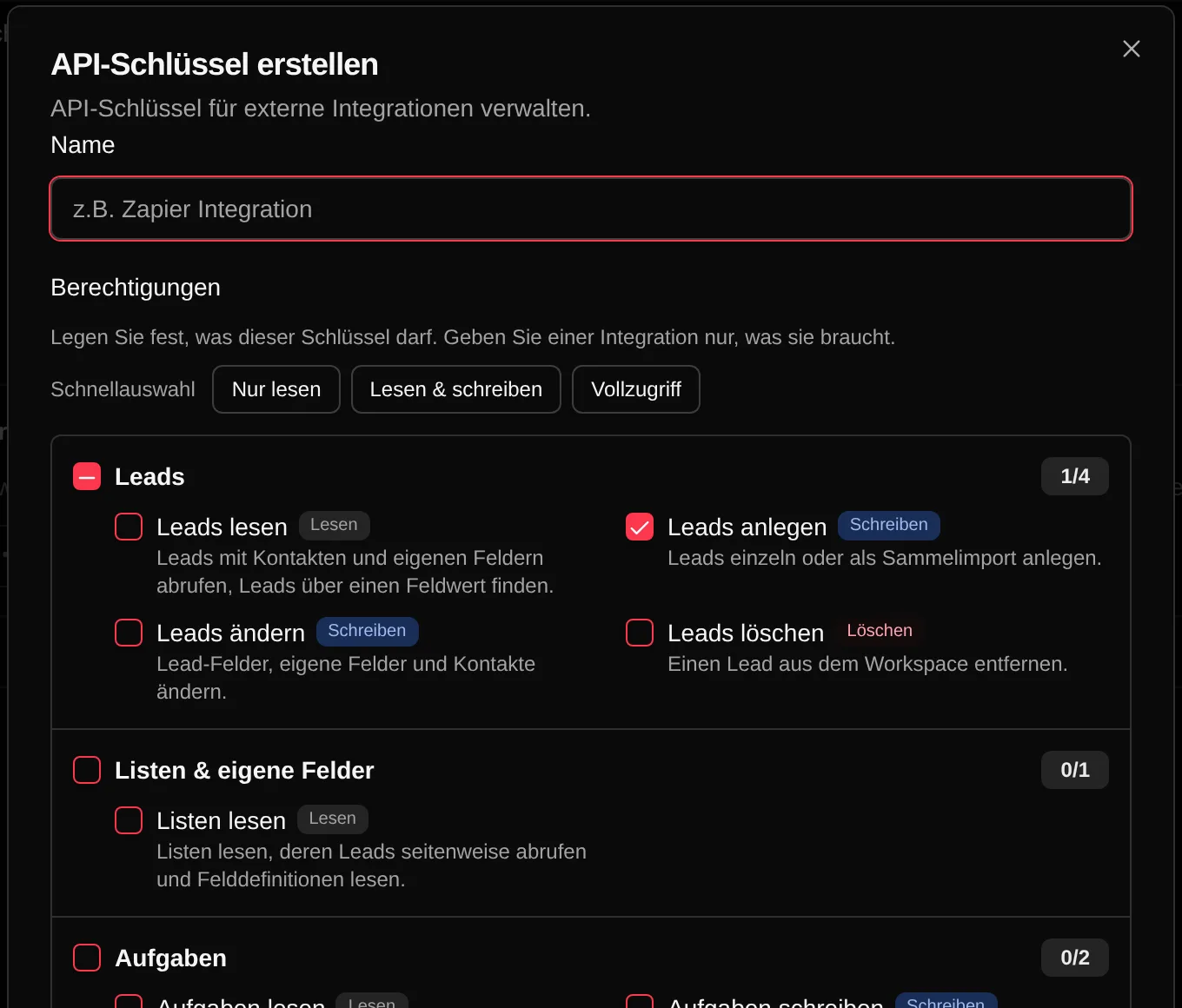
A key belongs to your workspace and only sees its data. You grant single permissions, such as read leads, create leads or write tasks, or use a quick preset. You see the key only once, when you create it. After that you can regenerate, pause or delete it and see when it was last used.
Import leads without duplicates
POST /v1/leads creates one lead, POST /v1/leads/import up to 5,000 at once, with contacts, addresses and custom fields. If the company already exists — same name and city or same phone number — Coldfire merges the two: empty fields get filled, new data added, nothing overwritten. The import status shows what's new, what was merged and which row failed.
Find leads by your own ID
Create a custom field, for example your customer ID, and search with GET /v1/leads?cf[<field ID>]=<value>. The response holds the whole lead with contacts, addresses and custom fields. One call is enough.
Change precisely
PATCH /v1/leads/:id changes exactly what you send: fields, custom fields, existing contacts by ID, new contacts and addresses. Whatever already exists, Coldfire doesn't create twice. DELETE marks a lead as done; a new import brings it back.
Lists, tasks and notes
Read your lists and page through their leads. Fetch the definitions of your custom fields. Create tasks with due date and assignee, tick them off or delete them. And add notes to leads.
Signed webhooks
The appointment webhook sends a JSON with meeting, lead and contact data to your URL for every booked meeting. With the workflow step “Webhook”, the same works after a documented call, with summary and extracted fields. Every request carries an HMAC-SHA256 signature in the X-Coldfire-Signature header. You can rotate the secret anytime.
Custom activities with a response
For a custom activity, Coldfire calls your server directly. It can return subject, text, text blocks and attachments for the email that opens next. That way the offer from your system goes straight into the email.
Who it's for
Developers
REST with JSON, the key in a header, an OpenAPI description. Errors come back as JSON with a message and, where it fits, a stable code.
Agencies with their own lead source
Your form, your scraper or your supplier sends leads straight into Coldfire. If they match a list's filters, the dialer calls them.
Team leads and ops
Meetings land in your project or billing tool by webhook. Tasks and notes come in from your other systems.
CSV files or the Coldfire API
| With CSV files | With the API | |
|---|---|---|
| New leads | export, upload, map columns | POST, up to 5,000 per request |
| Duplicates | clean up by hand | company and city or phone, merged |
| Your own customer ID | VLOOKUP in Excel | search by field value |
| Changes | upload the whole file again | PATCH only the changed fields |
| New meeting in another system | type it in | signed webhook |
| Access | share a login | keys with permissions |
Questions about the API
Try Coldfire free for 14 days.
Import your leads, connect your phone line, make the first call. Cancel anytime.
